Which Gemini Model Should I Use? A Practical Guide
This article is updated periodically as models are released.
Google’s Gemini app now offers five models, and three of them are brand new. Choosing the right Gemini model comes down to how hard your task is, how fast you need an answer, and which Google AI plan you are on. Google launched its Gemini 4 generation between September and November 2026 and dropped the familiar Pro and Flash naming for three new names: Carbon, Argon, and Hydrogen. In this guide we compare the current Gemini models, with practical examples of what each one is best at and what your plan includes.
Read our Claude model guide here.
Read our ChatGPT model guide here.
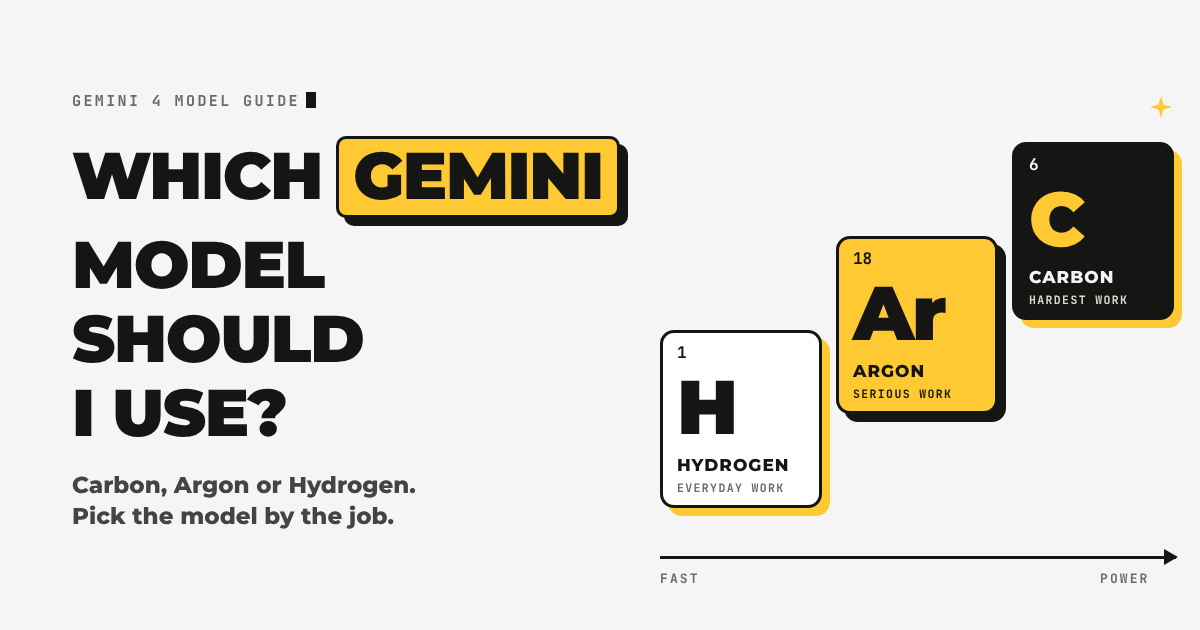
- Gemini 4 comes in three models: Carbon, Argon, and Hydrogen. Carbon is the most powerful, Argon handles most serious work, and Hydrogen is the fast everyday model.
- All three arrived this fall: Argon was announced September 30, Carbon became broadly available November 10, and Hydrogen launched November 12.
- Hydrogen is the big change for most people. Google calls it its “daily driver,” it now powers Google Search, and Google reports it scores level with Argon on a leading intelligence index at a lower price.
- Free accounts get Flash-Lite, plus Hydrogen when Auto picks it. AI Plus adds Hydrogen. AI Pro adds Gemini Pro and Argon. Carbon is AI Ultra only.
- Deep Think is being replaced by Gemini 4 Argon.
- Two dials control your results: which model, and how hard it thinks. Start with the smallest model and lowest thinking level that does the job well.
Your team has Gemini. Do they know which model to use?
Model versions change every few weeks. The skills that carry over don’t: picking the right model and thinking level for the job, prompting for real work, and building Gemini into daily workflows across Gmail, Docs, Sheets and Drive. We train teams hands-on in Gemini, Claude, ChatGPT and Copilot, using their own tasks.
Understanding the Gemini Lineup: Five Models for Different Work
Gemini used to be simple: Pro for hard work, Flash for speed, Flash-Lite for volume. Gemini 4 replaces those labels with three names taken from the periodic table. Carbon is the strongest, Argon is the frontier model for most serious work, and Hydrogen is the fast model for everyday tasks. Two older options, Gemini Pro and Flash-Lite, are still in the Gemini app menu, so you will see a mix of old and new names for a while.
One difference from Claude and ChatGPT trips people up: in the Gemini app, how much the model can read at once depends on your plan, not the model. Free accounts get a 32,000-token context window, AI Plus gets 128,000, and AI Pro and Ultra get one million. If you upload long documents, that matters as much as which model you pick.
Here is the full Gemini model comparison at a glance:
| Model | Best for | In the Gemini app | API price per million tokens |
|---|---|---|---|
| Gemini 4 Carbon | Your hardest, long-horizon work | AI Ultra | $2 in / $10 out until Nov 30, then $4 in / $20 out |
| Gemini 4 Argon | Most serious work: deep reasoning, analysis, research and coding | AI Pro and Ultra | $2 in / $10 out until Nov 30, then $4 in / $20 out |
| Gemini 4 Hydrogen | Fast everyday work, writing, coding and agent tasks | AI Plus and up (Free through Auto) | $1.50 in / $7.50 out |
| Gemini Pro | Previous-generation deep reasoning | AI Pro | $2 in / $12 out (Gemini 3.1 Pro, up to 200K tokens) |
| Flash-Lite | Quick, simple, high-volume tasks | Every plan | $0.30 in / $2.50 out (Gemini 3.5 Flash-Lite) |
If you only use Gemini through a subscription, you can ignore the prices. API pricing matters when your team builds tools or automations on Gemini, and it is billed separately from Google AI plans.
Carbon: Your Hardest Work
Google calls Gemini 4 Carbon its strongest model, with frontier performance in long-horizon agent work, software engineering, scientific reasoning, and cybersecurity. It is built for tasks that push a model to its limits, and it deliberately spends more effort than Argon exploring, reasoning, and checking its own work.
Best for:
- Long, multi-step projects with many moving parts
- Complex coding and debugging across a large codebase
- Open-ended research and scientific analysis
- Problems that Argon at its highest thinking level still struggles with
In practice: Hand Carbon a shared drive full of market research, interview notes, and pricing spreadsheets and ask for a finished go-to-market plan with the reasoning behind each recommendation. It can work out what to analyze first, test its own conclusions, and assemble a board-ready summary. It is also the model to reach for when a stubborn technical problem has defeated every other model, or when a task runs so long that lighter models lose the thread.
Carbon has a one-million-token context window in the API. It launched at an introductory $2 input and $10 output per million tokens through November 30, 2026, after which it lists at $4 input and $20 output. In the Gemini app it is limited to AI Ultra, and it is also rolling out in AI Mode in Search and in Google Antigravity, Google’s coding tool. Google also reports Carbon is markedly harder to misuse than Argon in its security testing, which matters if you plan to give it access to real systems.
Argon: Your Starting Point for Serious Work
Gemini 4 Argon is the deep-reasoning model for difficult problems, and for paid teams it is where serious work should start. Google says Argon “remains the ideal choice for the majority of software engineering and knowledge work,” and positions Carbon only for the harder tasks above that. Argon is also the replacement for Deep Think, Google’s older high-effort reasoning mode.
Best for:
- Complex research and analysis
- Legal, finance, and other knowledge work that needs careful judgment
- Long technical documents and contracts
- Multi-step coding and agent tasks
In practice: Ask Argon to review an 80-page vendor agreement against your standard terms and flag every clause that conflicts, with the reasoning for each flag. It does well on jobs like reconciling a messy financial model, pulling apart the assumptions in an analyst report, or planning and building a multi-step workflow. Use it when being right matters more than being fast.
Argon has a unified one-million-token context window in the API and can write up to one million tokens in a single response, up from 64,000 on earlier Gemini models. It shares Carbon’s pricing: $2 input and $10 output per million tokens at launch, then $4 and $20. In the Gemini app it is included starting with AI Pro.
Hydrogen: Everyday Work
Gemini 4 Hydrogen is the fast, cost-efficient model for everyday work, and for many people it will be the only Gemini model they need. Google calls it “our daily driver for agentic workflows.” Carbon and Argon handle deep, long-horizon reasoning, while Hydrogen is built for speed. Speed does not mean a big drop in quality: Google reports Hydrogen scores 51 on the Artificial Analysis Intelligence Index at its default setting, versus 50 for Argon.
Best for:
- Writing and creating content
- Summarizing and analyzing documents, emails, and spreadsheets
- Everyday coding and bug fixes
- Agent tasks that need to finish quickly
In practice: Hydrogen is the model that carries your day. Draft a client follow-up in the morning, turn a long email thread into action items before lunch, and build a formula-heavy summary in Google Sheets in the afternoon. Compared with Gemini 3.8 Flash, Google says it finishes tasks about 2.5 times faster at its default setting and makes more than five times fewer fabricated claims. It is also the model behind Google Search and AI Mode now, so many people are already using it without knowing.
Hydrogen accepts one million input tokens and runs at a flat $1.50 input and $7.50 output per million tokens across the full context window. In the Gemini app it is included starting with AI Plus, and free users get it when Auto decides a prompt needs it. Gemini in Google Sheets with Hydrogen starts with AI Pro and Ultra.
Gemini Pro: The Previous Generation
Gemini Pro is the deep-reasoning model from the Gemini 3 generation, currently Gemini 3.1 Pro. It is still in the model menu on AI Pro plans, but it is no longer the top option. For most new work, Argon is the stronger choice for hard problems and Hydrogen is the faster choice for everyday tasks.
The main reason to keep using Pro is stability. If your team tuned prompts, Gems, or workflows around it, it can make sense to keep it in rotation while you test Argon and Hydrogen on the same tasks. Switching models can change output in small ways, so test before you switch anything client-facing. In the API, Gemini 3.1 Pro runs $2 input and $12 output per million tokens for prompts up to 200,000 tokens.
Flash-Lite: Instant Answers
Flash-Lite is the lightest, fastest model in the Gemini app, built for small, routine requests where speed matters more than deep reasoning. It is the main model on free accounts, and it is also where paid plans land when they hit their usage limit.
Best for:
- Straightforward questions
- Simple summaries and rewrites
- Sorting and tagging
- Pulling specific information from text
In practice: Use Flash-Lite to rewrite a sentence, answer a quick factual question, or turn meeting notes into a short list. In the API, it is built for the high-volume, repetitive work that would be slow and expensive on a bigger model, such as tagging thousands of support tickets or pulling the date and amount from every invoice in a folder. When you are running the same simple task thousands of times, Flash-Lite is usually the cost-smart choice.
In the API, Gemini 3.5 Flash-Lite runs $0.30 input and $2.50 output per million tokens with a one-million-token context window. For the very cheapest work, the older Gemini 3.1 Flash-Lite ($0.25 / $1.50) and 2.5 Flash-Lite ($0.10 / $0.40) are still available.
How Hard Gemini Thinks: Thinking Levels and Auto
Beyond choosing a model, Gemini gives you a second dial: the thinking level, which controls how much the model reasons before answering. Higher levels mean deeper reasoning and better answers on hard problems, at the cost of speed and more of your usage limits. In the Gemini app, every plan gets three levels:
- Low: fast, concise answers for simple requests, such as rewriting a sentence or sorting an email.
- Medium: a balance of speed and reasoning. Good for most everyday work.
- High: deeper thinking for complex, multi-step prompts.
One detail catches people out: if you pick a model yourself and do not choose a thinking level, Gemini defaults to Low. If you switch to Argon for a hard problem, set the level to Medium or High too, or you may not get the depth you were paying for. Developers get one more level in the API: Hydrogen offers Low, Medium, High (its default), and a new Extra High setting.
Gemini also has Auto, which picks the model and thinking level for each prompt. On free accounts, most prompts go to Flash-Lite and harder ones may go to Hydrogen. If you turn Auto off, every free answer uses Flash-Lite. You will find the setting under Settings, then Usage limits. The practical rule is the same as with Claude and ChatGPT: start low and turn the dial up only when the answer is not good enough. For a deeper look at how this works across tools, see our guide to effort levels in Claude and ChatGPT.
Why Model Choice Matters
The temptation is to run everything on the most powerful model, but in Gemini that drains your limits fast. Gemini usage limits are based on how much computing each request takes. They refresh every five hours until you reach a weekly cap, and Google names stronger models, higher thinking levels, Deep Research, and image and video generation as the biggest drains. When a paid plan runs out, your chat keeps going on Flash-Lite, which is not where you want to be in the middle of important work.
The better approach is to use the smallest model that does the job well, then escalate only the tasks that need more. Teams that run everyday work on Hydrogen, serious work on Argon, and save Carbon for the genuinely hard problems get more out of the same plan with no drop in quality.
Which Models You Can Access and On What Plans
For personal Google Accounts, the models available in the Gemini app depend on your Google AI plan (US prices shown):
| Plan | Chat models | Context window | Usage limits |
|---|---|---|---|
| Free | Auto or Flash-Lite (Hydrogen when Auto picks it) | 32K tokens | Standard |
| AI Plus ($4.99/month) | Flash-Lite, Hydrogen | 128K tokens | 2x Free |
| AI Pro ($19.99/month) | Flash-Lite, Hydrogen, Pro, Argon | 1M tokens | 4x Free |
| AI Ultra ($99.99 or $199.99/month) | Flash-Lite, Hydrogen, Argon, Carbon | 1M tokens | 5x or 20x AI Pro |
A few details trip people up. First, choosing a model yourself requires a paid plan. Free accounts can use Auto or Flash-Lite, and models marked with a lock icon need an upgrade. Second, the Gemini app also has a Tasks mode for longer, multi-step jobs, and it uses Hydrogen on every plan, adds Argon on AI Pro, and adds Carbon on AI Ultra. Third, Deep Think, the older high-effort reasoning option, is being replaced by Argon, so do not build habits around it.
Work and school accounts are different. If your company uses Gemini through Google Workspace or Gemini Enterprise, your Workspace license and your admin’s settings decide which models you see. Carbon and Hydrogen are both available in Gemini for business, but admins may need to switch a model on before staff can use it. Developers can call any of these models by name through the Gemini API, where you pay per token rather than a flat subscription. Because access and limits change often, check your plan or ask your admin to confirm what you can use.
How to Choose: A Practical Decision Guide
- For quick questions, simple rewrites, and high-volume tasks: Flash-Lite, or leave Auto on. On the Free plan, this is your main model.
- For everyday writing, documents, spreadsheets, and day-to-day work: Hydrogen at Low or Medium. On AI Plus, this is the best place to start.
- For hard research, long documents, important writing, and demanding coding: Argon at Medium or High. On AI Pro, this is your go-to for serious work.
- For your most complex, long-horizon projects that Argon at High cannot crack: Carbon, on AI Ultra.
- For prompts and workflows already tuned to the old model: Gemini Pro, while you test the Gemini 4 models side by side.
At The AI Consulting Lab, we help clients match the right Gemini model to each workflow so they get strong results without burning through their limits. A common setup today is Hydrogen for daily drafting and documents, Argon for serious analysis, Flash-Lite or Auto for quick lookups, and Carbon held in reserve for the hardest jobs.
If your team also uses Claude or ChatGPT, our Claude model guide and ChatGPT model guide use the same “pick the model, then the effort” approach, so you can compare all three side by side.
Frequently Asked Questions
- What is the best Gemini model?
- Gemini 4 Carbon is the most capable model Google offers, but the best model for you is the one that fits your task and plan. Google itself recommends Argon for most software engineering and knowledge work, and Hydrogen handles everyday tasks faster and at a lower cost.
- Is Gemini 4 Hydrogen good enough for most work?
- Yes. For the majority of writing, documents, spreadsheets, coding, and everyday tasks, Hydrogen delivers strong results, and Google reports it scores level with Argon on a leading intelligence index. Move to Argon when the work is complex, open-ended, or high-stakes.
- What is the difference between Argon and Carbon?
- Argon is the frontier model for most serious work. Carbon is Google’s strongest model, built for the hardest long-horizon tasks, and it spends more effort checking its own work. Both cost the same in the API, but Carbon is only in the Gemini app on AI Ultra.
- What happened to Deep Think?
- Google says Deep Think is being replaced by Gemini 4 Argon, which it describes as surpassing Deep Think’s capabilities. If you used Deep Think on AI Ultra, Argon is its successor.
- Which Gemini models are on the free plan?
- Free accounts get Auto or Flash-Lite. With Auto on, Gemini may use Hydrogen for prompts that need more reasoning. Choosing Hydrogen, Pro, Argon, or Carbon yourself requires a paid plan.
- Is Carbon included in Google AI Pro?
- No. In the Gemini app, Carbon is only available on AI Ultra. AI Pro includes Argon, Hydrogen, Pro, and Flash-Lite.
- What happened to Gemini Flash and Gemini 2.5?
- In the Gemini app, Hydrogen has taken over the everyday role Flash used to play. For developers, Gemini 3.8 Flash is still available in the API, and requests to Gemini 2.5 Pro and 2.5 Flash are rerouted to newer models starting December 1, 2026, so update any automations that still call them.
Conclusion
Gemini’s lineup now gives you a clear range, from the instant speed of Flash-Lite to the frontier capability of Carbon. The Gemini 4 launch moved the sweet spot: Hydrogen now does most everyday work fast and well, so for most teams the answer is Hydrogen for daily tasks, Argon for serious work, and Carbon only for the hardest problems. Once you understand what each model is built for, how the thinking dial works, and what your plan includes, you get better results without wasting your limits on capability you do not need.
Interested in upskilling your staff on Gemini, Claude, ChatGPT, or Copilot? Schedule a free 30-minute AI discovery call with The AI Consulting Lab to find the best fit for your business.
Model Update Timeline
Google rebuilt the top of the Gemini lineup in about six weeks and reshuffled what each plan gets along the way. If your model menu looks different, this is why.
| Date (2026) | What happened |
|---|---|
| Sept 2 | Gemini 3.8 Flash released for developers in the Gemini API |
| Sept 30 | Gemini 4 Argon announced as Google’s new frontier model, starting with cyber defenders |
| Oct 9 | Gemini app access reshuffled: free accounts move to Flash-Lite, with stronger models reserved for paid plans |
| Oct 13 | Gemini 4 Argon reaches paying developers in the Gemini API |
| Nov 10 | Gemini 4 Carbon becomes available in the API, Gemini for business, and for AI Ultra subscribers in the Gemini app and AI Mode |
| Nov 12 | Gemini 4 Hydrogen launches in the Gemini app, Google Search, Gemini in Sheets, and the API |
| Nov 30 | Introductory API pricing for Carbon and Argon ends |
| Dec 1 | Gemini API requests to Gemini 2.5 Pro and 2.5 Flash are rerouted to newer models |
Sources:
- Google – Introducing Gemini 4 Hydrogen
- Google – Gemini 4 Carbon is now available
- Google – Gemini 4 Argon
- Gemini Apps Help – Gemini models in the Gemini app
- Gemini Apps Help – Limits and upgrades for Google AI subscribers
- Gemini Apps Help – Deep Think
- Google – Google AI plans
- Google AI for Developers – Gemini API pricing