Which ChatGPT Models Should I Use? A Practical Guide
This article is updated periodically as models are released.
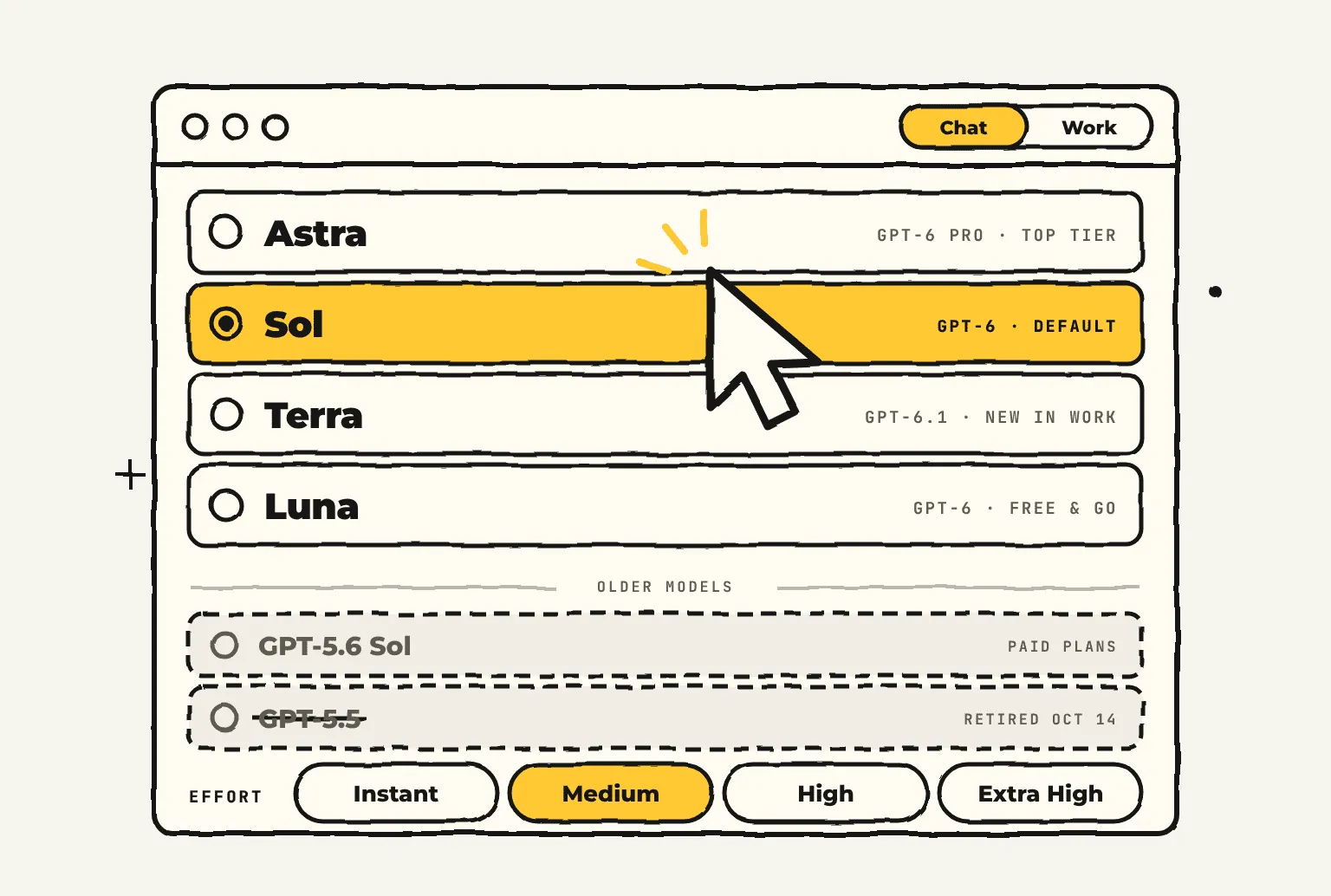
Choosing the right ChatGPT model depends on what you need most, such as speed, reasoning, cost, or the ability to handle long and complex work. OpenAI changed the lineup again in October 2026: GPT-6 is now the default in ChatGPT, and some of the newest models only live in ChatGPT Work and Codex. In this article, you will find a practical guide to the GPT-6 family (Luna, Terra, Sol and Astra), what each plan gets, and the previous-generation models that are still around.
Read our Claude model guide here.
Read our Gemini model guide here.
- GPT-6 became the default in ChatGPT on October 7, 2026. Plus, Pro, Business and Enterprise get GPT-6 Sol. Free and Go get GPT-6 Luna.
- The GPT-6 family has four classes, from lightest to most capable: Luna, Terra, Sol and Astra.
- GPT-6 Astra is OpenAI’s top model. In Chat it powers the Pro option (GPT-6 Pro) on Pro, Business and Enterprise plans. Plus gets Astra in ChatGPT Work and Codex.
- The newest point releases, GPT-6.2 Sol and GPT-6.2 Terra, are in ChatGPT Work and Codex, not regular Chat.
- GPT-5.5 was retired from ChatGPT on October 14, 2026. GPT-5.6 Sol is still selectable on paid plans.
- Two dials control your results: which model, and how hard it thinks. Start low and turn effort up only when the task needs it.
Your team has ChatGPT. Do they know which setting to use?
Model names change every few weeks. The skills that carry over don’t: picking the right model and effort for the job, prompting for real work, and building AI into daily workflows. We train teams hands-on in ChatGPT, Claude, Gemini and Copilot, using their own tasks.
The Four GPT-6 Model Classes: Luna, Terra, Sol and Astra
OpenAI now names its models by class as well as version number. The logic is simple: a higher class is more capable and costs more.
| Model | Role | Best for | API price per 1M tokens (input / output) |
|---|---|---|---|
| Luna | Fast and light | Quick questions, simple summaries, high-volume tasks like pulling fields from documents | $0.10 / $0.50 (GPT-6 Luna) |
| Terra | Everyday balance | Writing, visual reasoning and computer use at a lower cost | $1 / $5 (GPT-6.1 Terra) |
| Sol | Flagship workhorse | Most business work: analysis, coding, research and multi-step tasks | $2 / $10 (GPT-6.1 Sol) |
| Astra | Top tier | Your hardest, highest-stakes problems | $10 / $50 (GPT-6 Astra) |
If you only use ChatGPT through a subscription, you can ignore the prices. API pricing matters when your team builds tools or automations on OpenAI’s models, and it is billed separately from ChatGPT plans. For comparison, GPT-5.6 Sol now runs $4 / $20, so GPT-6.1 Sol costs about half as much.
Chat vs. Work: Where Each Model Lives
ChatGPT now has two sides, and they do not run the same models.
- Chat is the familiar conversation experience. You pick “GPT-6” in the model menu (it is not labeled Sol or Luna), and your plan decides which model powers it.
- Work and Codex are built for longer, task-driven work and coding. This is where you will find GPT-6.1 Sol, GPT-6.1 Terra, GPT-6 Astra on eligible plans, and the GPT-5.6 Sol, Terra and Luna models.
If someone on your team says “I can’t find Terra in ChatGPT,” this is why. Terra is not available in Chat. Switch to Work.
What Your Plan Gets in Chat
| Plan | Chat model | Thinking levels |
|---|---|---|
| Free and Go | GPT-6 Luna | Instant, plus Think for harder questions |
| Plus | GPT-6 Sol | Instant, Medium, High |
| Pro | GPT-6 Sol, plus GPT-6 Pro (Astra) | Instant through Extra High, plus Pro |
| Business | GPT-6 Sol, plus GPT-6 Pro (Astra) | Instant through Extra High, plus Pro |
| Enterprise | GPT-6 Sol, plus GPT-6 Pro (Astra) | Instant through Extra High, plus Pro, subject to workspace permissions |
Plus does not include Extra High or Pro in Chat, but it does include GPT-6 Astra in Work and Codex. On Business and Enterprise, admins can limit which models members use, and some Enterprise workspaces may still see the older model picker while the rollout finishes. GPT-6 Pro has its own usage limits, even on Pro plans.
The Two AI Dials: Intelligence Level and Effort
You control two separate settings. Think of them as two dials.
Dial one: Intelligence level (which model). This is the class: Luna, Terra, Sol or Astra. In Chat, your plan mostly picks it for you. In Work and Codex, you choose it from the model list.
Dial two: Effort (how hard it thinks). Once you pick a model, you can tell it how much reasoning to apply before answering. More effort means deeper thinking and better answers on tough problems, but slower responses and more of your usage limits. In Chat, it is the Thinking slider:
- Instant: fast responses for everyday questions, such as rewriting a sentence or classifying an email.
- Medium: standard thinking. Good for planning, analysis, or anything with a few moving parts.
- High: extended thinking for harder, multi-step work.
- Extra High: the highest level on GPT-6 Sol, for work where careful reasoning really matters.
- Pro: GPT-6 Pro, powered by Astra, for the most difficult tasks and longer-running work.
The practical rule: start with the lowest effort that gets the job done, then turn it up only when the task actually needs more thinking. More effort is not automatically better. On a simple task, a very high effort level can cause the model to overthink and add caveats you do not need, while costing more and taking longer. For a deeper look, see our guide to effort levels in Claude and ChatGPT.
GPT-6 in Chat also adds what OpenAI calls Intelligent UI. Answers can include visuals, side-by-side comparisons and small interactive tools when they help, and a response can start while ChatGPT keeps thinking. It works from Instant through Extra High, but not with Pro.
Why Some Teams Still Use Previous ChatGPT Models
Even with GPT-6 available, many teams keep previous-generation models in rotation. The main reasons are practical rather than emotional.
First, cost and speed. For simple, high-volume tasks, a lighter model can be the smarter choice than paying for frontier capability you do not need. Second, workflow stability. Teams that tuned prompts and automations around a specific model, such as GPT-5.6 Sol, often keep using it so their systems keep behaving predictably while they test newer models. Switching models can change output in small ways, so test before you switch, especially for anything client-facing. For business owners, this continuity means you can adopt the newest models on your own timeline without disrupting what already works.
Which Previous Models Are Still Available and Who Can Use Them
The GPT-6 rollout did not retire older selectable models. Here is the general picture:
- GPT-5.6 Sol and GPT-5.6 Sol Pro: still selectable in Chat on paid plans. If you explicitly chose GPT-5.6 Sol, your conversations stay on it.
- GPT-5.6 Terra and Luna: not selectable in Chat, but available in Work, Codex and the API, depending on your plan.
- GPT-5.5: retired from ChatGPT, Work and Codex on October 14, 2026. API access is unchanged.
- Older models: o3 was retired from ChatGPT on August 26, 2026 and GPT-4.5 on June 27. GPT-4o, GPT-4.1, o4-mini and GPT-5 left ChatGPT on February 13. Some remain in the API.
For businesses, this tiered access matters. A small team might run everyday work on GPT-6 in Chat, use Terra in Work for cheaper repeat tasks, and save GPT-6 Pro or Astra for high-stakes analysis.
How to Choose: A Practical Decision Guide
The best model and effort combination depends on your goal. Here are some common scenarios:
- For everyday productivity and quick answers: GPT-6 at Instant or Medium. On a Free or Go plan, Luna handles this well.
- For strategy, planning, or complex research: GPT-6 at High, or Extra High on Pro, Business and Enterprise. Use Pro for your most important, high-stakes questions.
- For simple, high-volume work like tagging or drafting: Luna, or GPT-6.1 Terra in Work if quality needs a bump.
- For coding and agentic tasks: GPT-6.1 Sol in Work or Codex, or GPT-6 Astra for the most demanding, long-running projects.
- For the hardest, highest-stakes work: GPT-6 Pro in Chat on Pro, Business and Enterprise, or Astra in Work and Codex from Plus up. Check the output before you act on it.
At The AI Consulting Lab, we often help clients match the right model and effort to their workflows. For example, a retail company might run staff-facing tasks on GPT-6 at Medium while reserving GPT-6 Pro for pricing analysis and forecasting. Choosing the right fit keeps quality high without overpaying for capability you do not need.
If your team also uses Claude, our Claude model guide uses the same “pick the model, then the effort” approach, so you can compare the two side by side.
Future Outlook: Model Access and Best Practices
The history of ChatGPT models shows that availability changes quickly. GPT-6 Astra arrived about eight weeks after GPT-5.6, and GPT-6 replaced GPT-5.6 as the Chat default about five weeks after that. Model names will keep changing, so do not build your team’s habits around one of them. Teach people the dials (model class and effort) and the Chat vs. Work split instead. Those carry over when the next version ships.
For businesses, the best practice is to stay flexible. Test new models and effort levels early, but keep a stable option in rotation until you are confident in the replacement. Because access and effort options depend on your plan, it is worth reviewing your subscriptions and admin settings each quarter, so people are not paying for access they do not use or missing access they need.
Conclusion
For most teams the answer is simple: use the GPT-6 default, keep effort low for routine work, turn it up for hard problems, and use Work when the job is a real task rather than a conversation. Once you understand the two dials, intelligence level and effort, you can match ChatGPT to the task in front of you and get better results at a lower cost. The bigger gap is rarely the model. It is whether your people know how to use it on their actual work.
Interested in upskilling your staff on ChatGPT, Claude, Gemini, or Copilot? Schedule a free 30-minute AI discovery call with The AI Consulting Lab to find the best fit for your business.
Model Update Timeline
OpenAI rebuilt the ChatGPT lineup in about five weeks. If your team’s model menu looks different than it did in September, this is why.
| Date (2026) | What happened |
|---|---|
| Sept 3 | GPT-6 Astra introduced as OpenAI’s most capable model |
| Sept 22 | GPT-6 Sol and GPT-6 Luna arrive in ChatGPT Work and Codex |
| Sept 29 | GPT-6.1 Sol rolls out in Work and Codex, starting with Pro |
| Oct 7 | GPT-6 becomes the Chat default: Sol on paid plans, Luna on Free and Go (from Oct 8) |
| Oct 14 | GPT-5.5 retired from ChatGPT, Work and Codex (API unchanged) |
| Oct 26 | GPT-6.1 Terra rolls out in Work, Codex and the API |
| Oct 29 | GPT-6 tuned for shorter, less flattering replies on Free and Go |
Sources:
OpenAI Help Center – ChatGPT release notes
OpenAI Help Center – Model Release Notes
OpenAI Help Center – GPT-6 and other models in ChatGPT
OpenAI – GPT-6 Astra: A new generation of intelligence
OpenAI API – Pricing